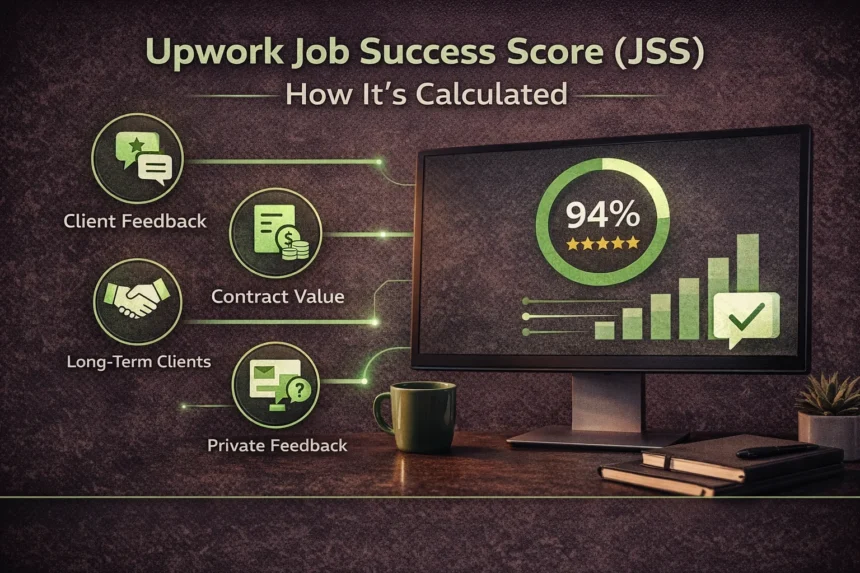
Most Upwork freelancers treat JSS as a report card, something that reflects past work and gets updated occasionally. That framing leads to the most common JSS mistake: doing nothing proactively and reacting only after the number has already dropped.
JSS is better understood as a weighted ranking system that recalculates daily based on a rolling window of contracts, client behavior, and feedback data, including a layer of feedback that is completely invisible to the freelancer. Platforms like Upwork operate differently from Fiverr precisely because of systems like this: metrics that affect visibility, client trust, and access to the platform’s best opportunities are governed by rules that go well beyond a public star rating.
This guide covers exactly how JSS is calculated, including the confirmed mechanics, the contract weighting structure, and the private feedback layer most freelancers never discover, plus the specific strategies that protect a healthy score and recover a damaged one.
What Is the Upwork Job Success Score?
The Job Success Score is Upwork’s internal measure of a freelancer’s overall client satisfaction across their contract history. It is expressed as a percentage and is displayed publicly on the freelancer profile once the threshold conditions are met. It is the primary input that Upwork’s search algorithm uses to rank freelancers in client search results, making it the single metric with the most direct impact on earnings potential.
JSS Thresholds: What 90%, 80%, and Below 75% Mean in Practice
| JSS Range | Status | Practical Impact |
|---|---|---|
| 90%+ | Top Rated eligible | Access to Top Rated badge, feedback removal perk, premium search visibility |
| 80–89% | Good standing | Full platform access, normal search visibility |
| 75–79% | At risk | Reduced search visibility, no badge eligibility |
| Below 75% | Probationary | Severe visibility reduction, potential account restrictions |
| Below 70% (sustained) | Account review | Risk of platform removal |
The 90% threshold is the score that materially changes the Upwork experience. Top-rated status unlocks the ability to remove one piece of public feedback every 10 contracts or 3 months, a protection mechanism that has no equivalent at lower score levels. The difference between 89% and 90% is not cosmetic; it is the difference between having and not having a tool to manage reputational damage from a difficult client.
When JSS First Appears on Your Profile
JSS does not appear on a new profile until Upwork has enough data to calculate it reliably. The general threshold is a minimum of 2 contracts with feedback, but Upwork does not publish an exact figure. Before JSS appears, carefully building early contracts and selecting clients likely to leave positive feedback are the primary JSS protection strategies, because the first two or three contracts disproportionately influence the initial score.
Exactly How Upwork Calculates Your JSS (The Four Factors)
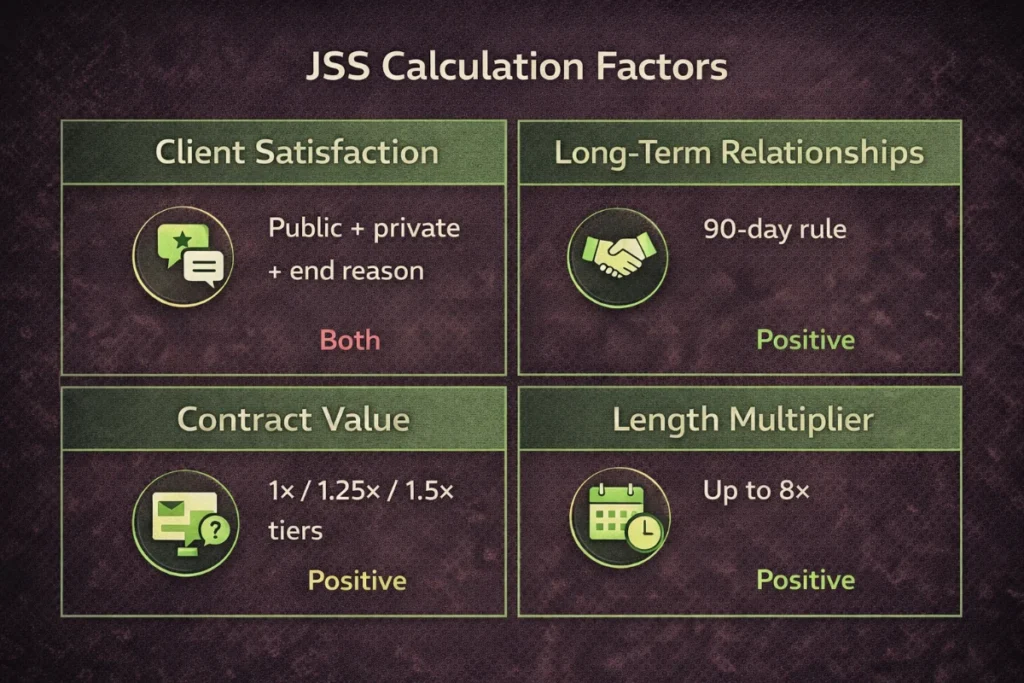
Upwork’s official documentation describes JSS as based on “outcomes” across contracts but deliberately avoids publishing a precise formula. What is confirmed by the official help documentation and by observable behavior reported across the freelancer community over several years is that four factors drive the calculation.
Client Satisfaction: The Three-Part Score Inside This Metric
Client satisfaction is the most heavily weighted factor and has three components:
- Public feedback: The star rating (1–5) and the client’s written review left at contract close. This is visible to everyone.
- Private feedback: A separate score collected from the client at contract close that the freelancer never sees. This is covered in full in the next section because it operates differently from every other component.
- End-contract reason: When a client closes a contract, Upwork asks them why. The reasons that signal negative outcomes, “work was not satisfactory,” “freelancer stopped responding,” “dispute”, feed directly into JSS as negative signals even if no public star rating is left.
The three components together mean that a client who leaves a 5-star public review can still produce a negative JSS impact if the private feedback is poor or if the contract was closed for a negative reason.
Long-Term Client Relationships and the 90-Day Rule
Upwork rewards contract continuity. Any contract that generates at least one payment every 90 days is automatically treated as an ongoing positive signal, regardless of whether the client leaves feedback at that milestone. This means a long-running retainer with a client who never leaves reviews is still contributing positively to JSS through its activity pattern alone.
The structural implication is significant: one long-term client relationship with consistent 90-day billing cycles contributes more positively to JSS than multiple short-term contracts of the same total value, because each 90-day interval with payment adds the equivalent of one additional successful contract to the calculation, up to the cap described in Factor 4.
Contract Value Weighting
Not all contracts carry the same weight in the JSS calculation. Upwork confirms a tiered weighting structure based on the total contract earnings:
| Contract Earnings | JSS Weight |
|---|---|
| $1 – $250 | 1× (baseline) |
| $251 – $1,000 | 1.25× |
| $1,000+ | 1.5× |
This weighting structure has a direct strategic implication for JSS recovery: a single $1,500 contract with a positive outcome contributes 50% more to the score than a $200 contract. Pricing freelance work at rates that attract higher-value contracts supports both income and JSS stability. A $1,000+ project with a satisfied client repairs score damage faster than six $200 projects with the same satisfaction level.
Contract Length Multiplier (Up to 8× on a Single Contract)
The long-term relationship bonus has a cap and mechanics that most freelancers are unaware of. For any single contract:
- Every 90 days with at least one payment adds the equivalent weight of one additional successful contract
- This bonus compounds up to a maximum multiplier of 8× the base weight
- A contract running for two years with consistent 90-day billing is therefore weighted as if it were 8 separate successful contracts
The practical meaning: a freelancer with one excellent two-year client relationship has significantly more JSS protection than a freelancer with the same number of total contract hours distributed across shorter engagements. The single long-term client functions as an anchor, stabilizing the overall score.
Private Feedback: The Hidden JSS Killer Most Freelancers Don’t Know About
This is the part of the JSS system that produces the most confusion and the most damage to scores that look healthy on the surface.
What Private Feedback Actually Is
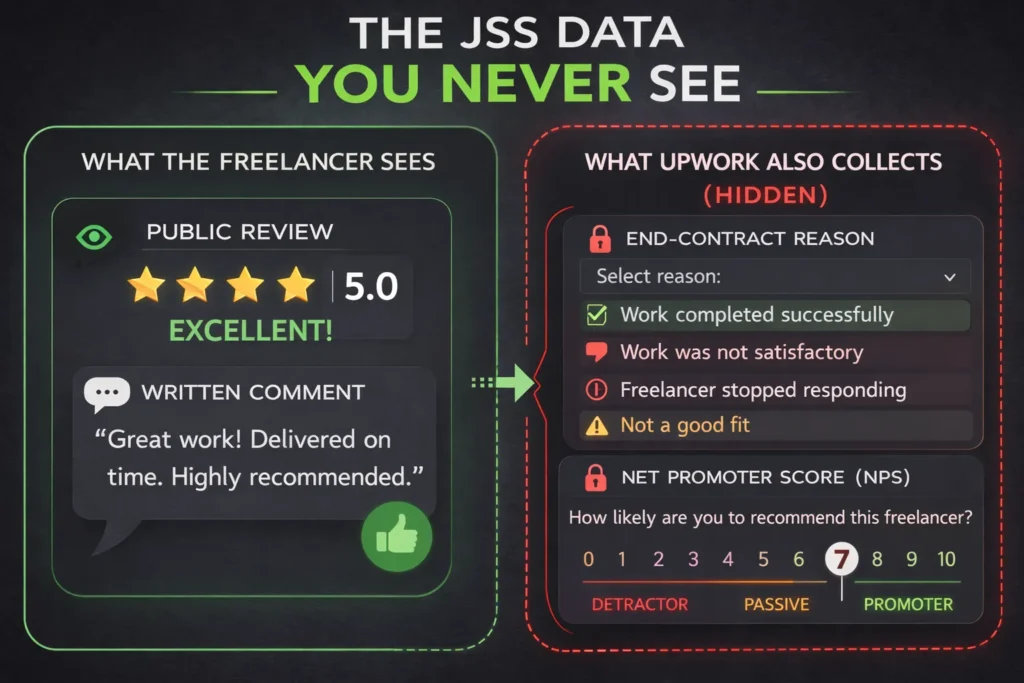
When a client closes a contract on Upwork, the platform asks them two questions that the freelancer never sees:
- The end-contract reason: A dropdown selection describing why the contract ended; options include “work completed successfully,” “freelancer was not a good fit,” and “I had concerns about the quality.”
- The Net Promoter Score question: “How likely are you to recommend this freelancer to a colleague?” on a 0–10 scale.
Both responses are completely hidden from the freelancer. There is no notification that private feedback was left, no way to read it, and no way to dispute it. The client cannot revise private feedback after submission, unlike public reviews, which clients can update within 14 days and which freelancers can respond to publicly.
Why a 5-Star Public Review Can Still Tank Your JSS
The disconnect between public ratings and JSS movement is almost always explained by private feedback. A client who genuinely liked the final deliverable but found the communication slow, the revision process frustrating, or the scope management unclear may leave a 5-star public review out of professional courtesy while simultaneously rating a 4 or 5 out of 10 on the private NPS question.
An NPS score below 9 is generally interpreted as a passive or detractor response. On a 0–10 scale, a 7 is not a strong score; it signals a client who would not actively recommend the freelancer. Repeated 7-range private scores across multiple contracts produce JSS movement that appears inexplicable when only the public feedback is considered.
This is the mechanism behind the freelancer experience reported frequently in Upwork community forums: “My reviews are all 5 stars and my JSS keeps dropping.” The public reviews are fine. The private feedback is not.
What You Can and Cannot Do About Private Feedback
Direct control over private feedback is not possible, the feedback is already submitted by the time the contract closes. What can be influenced is the client’s state of mind during and at the end of the contract, which shapes both the private NPS score and the end-contract reason they select.
Three practices that shift private feedback outcomes:
- Proactive communication throughout the contract — clients who feel informed and consulted during the work are more likely to rate 9–10 on the NPS question than clients who receive deliverables without context
- A closing message that surfaces satisfaction — a brief message at contract close that asks, “Is there anything else that would make this project complete for you?” gives the client a final opportunity to raise concerns directly rather than expressing them in private feedback
- Setting expectations at the proposal stage — clients who receive exactly what was scoped and described in the proposal report higher private satisfaction than clients who receive good work that did not match what they thought they were getting
Which Contracts Count Toward JSS and Which Don’t
Eligible vs. Ineligible Contracts
Not every contract on an Upwork account feeds into JSS. Upwork excludes from the calculation:
- Contracts with $0 earned — a contract that was opened and never paid does not count positively, but a contract closed for a negative reason with $0 earned can still register as a negative signal through the end-contract reason
- Contracts with a client who has since been suspended — Upwork removes these from the calculation if the client account is removed for platform violations
- Contracts explicitly excluded by Upwork support in cases of verified client misconduct
The $0 earned nuance is the one most damaging in practice: a contract where a client approved the scope, work was delivered, but no payment was ever processed, due to a dispute, a client disappearing, or a scope disagreement, can still produce a negative JSS signal through the end-contract reason the client submitted (or that Upwork assigns by default when a contract goes inactive).
Why Open Ghost Contracts Are Silently Damaging Your Score
A ghost contract is an open contract with no recent activity. A client hired a freelancer; the work was completed informally, without closing the contract, and the contract has remained open for months or years. Ghost contracts are among the most consistently overlooked JSS issues.
The damage mechanism: Upwork’s algorithm treats long-inactive open contracts as ambiguous signals. More critically, when Upwork eventually auto-closes them, the system-assigned end-contract reason is rarely positive. Auditing and properly closing all ghost contracts, by sending the client a professional message requesting they close the contract or by reaching out to Upwork support, removes a source of negative pressure on JSS that most freelancers do not realize exists. A clear scope agreement before any work begins is the structural protection against contracts drifting into ghost status, because a defined deliverable and a defined completion point create a natural contract close rather than an indefinitely open engagement.
How Long Does a Bad Review Take to Age Out?
The 6/12/24-Month Rolling Window
Upwork calculates JSS using three separate time windows, 6 months, 12 months, and 24 months, and displays the best of the three on the profile. This design means a freelancer who had a difficult period 18 months ago may display a JSS based on only the last 6 months of contracts, displaying only the most recent 6-month data, while the older damage remains in the background.
The practical implication is that JSS recovery does not require waiting the full 24 months. If the most recent 6 months of contracts are uniformly positive and sufficient in number to produce a reliable score, Upwork will display the 6-month calculation as the profile JSS, even while the 24-month window still contains negative data.
The Real Timeline From Damage to Recovery
The recovery timeline depends on two variables: the number of negative contracts in the history and the rate at which new positive contracts can be completed. A rough framework based on observable recovery patterns:
| Starting Score | Contracts Needed to Recover to 90% | Realistic Timeline |
|---|---|---|
| 85–89% | 3–5 positive contracts (medium value) | 4–8 weeks |
| 75–84% | 6–10 positive contracts (medium-high value) | 2–4 months |
| Below 75% | 10–15+ positive contracts (focus on higher value) | 4–8 months |
These timelines assume consistent contract completion, not one-off projects followed by inactivity. The rolling window calculation rewards both volume and recency.
What “Aging Out” Actually Means for Your Strategy
Aging out is not passive. Waiting for negative contracts to fall outside the 24-month window while doing nothing else produces a profile with a thin recent history, which Upwork may evaluate less favorably than a profile with a larger, more recent sample. The correct approach is to aggressively build positive contract history while the negative data ages, so that by the time the older damage falls out of the window, the new positive history is already dominant.
How to Protect Your JSS Before a Contract Ends
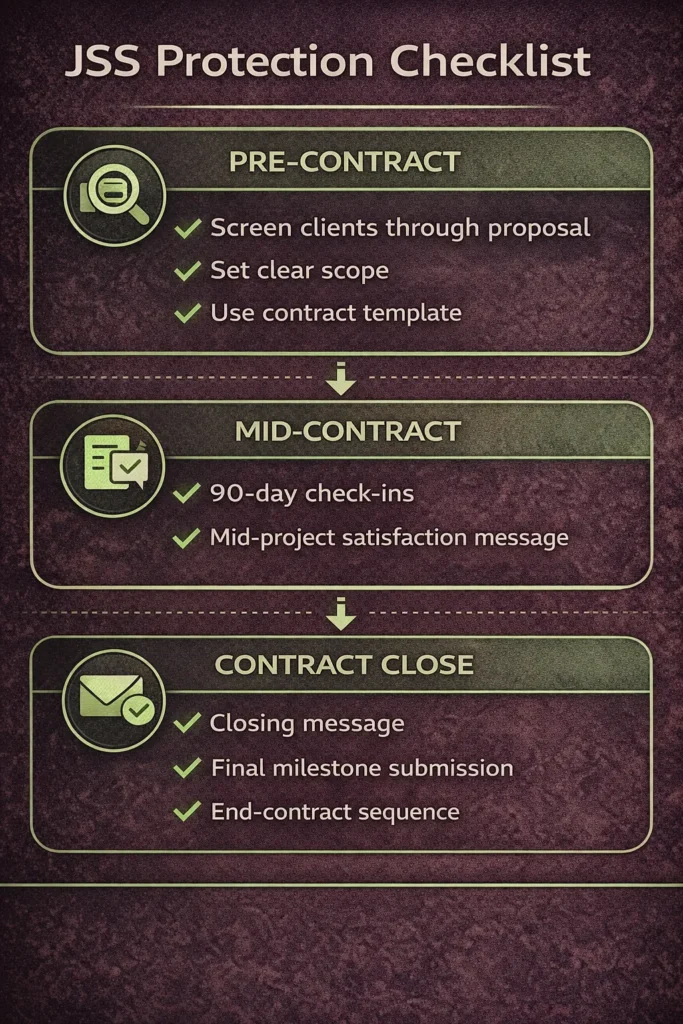
The Mid-Project Check-In That Prevents Bad Reviews
A structured mid-project check-in, a brief message sent roughly halfway through any significant contract, surfaces dissatisfaction while there is still time to address it. The message does not need to be elaborate:
“Just checking in as we reach the midpoint, everything tracking as expected on your end? Happy to adjust the approach on anything before we move into the final phase.”
This message does three things: it signals that the freelancer actively monitors the client’s satisfaction; it gives the client an explicit channel to raise concerns; and it shifts the dynamic away from a client who accumulates private frustrations and expresses them only in end-of-contract feedback.
Requesting feedback at the right moment follows the same principle, timing the ask for when satisfaction is highest, rather than leaving it to chance at contract close.
How to Close a Contract Properly
The manner in which a contract closes affects both the end-contract reason the client selects and the JSS signal it generates. A professional close sequence:
- Deliver the final work with a clear summary of what was completed against the original scope
- Send a brief closing message confirming the project is complete and asking if anything else is needed
- If on a fixed-price contract, submit the final milestone, do not leave it awaiting client approval indefinitely, as this creates ambiguity in the contract status
- After client approval, send a message thanking them and gently noting that you will be ending the contract from your side
Never close a contract abruptly or without confirmation. The end-contract reason submitted by a client who felt the close was rushed or unclear will not be “work completed successfully.”
Why Higher-Value Contracts Are the Fastest JSS Repair Tool
Because of the 1.5× weighting for contracts over $1,000, the most efficient path to JSS improvement is not to maximize the number of contracts; it is to maximize the value of each contract completed with a positive outcome. Structuring rates to attract higher-value engagements directly accelerates JSS recovery by increasing the weight each positive outcome contributes to the calculation. A strategy of accepting many small, low-value contracts during recovery generates less JSS improvement per unit of work delivered than fewer, higher-value contracts with the same satisfaction rate.
How to Handle a Client You Think Will Leave a Bad Review
Early Warning Signals a Contract Is Going Wrong
The signals that a contract is heading toward a negative outcome are almost always present before the end-of-contract feedback is submitted:
- The client has gone quiet after a deliverable was submitted, no response to follow-up messages within 48–72 hours
- The client is requesting revisions outside the originally scoped work and expressing frustration when the scope boundary is enforced
- The client has submitted a dispute or raised a concern with Upwork support
- The client is using language in messages that signals dissatisfaction: “this isn’t what I expected,” “I’m not sure this is working,” “I may need to reconsider.”
Each of these signals warrants a proactive conversation before the contract closes. Identifying client red flags at the proposal stage reduces the frequency of these situations. A strong proposal process screens for clients whose expectations are misaligned with the freelancer’s delivery approach before any contract is signed.
The Conversation to Have Before the Contract Closes
When a contract shows warning signs, a direct but non-defensive message sent before the client initiates the close creates an opportunity to resolve the issue while the outcome is still changeable:
“I want to make sure we end this project on solid ground. If there’s anything about the deliverable or the process that didn’t meet your expectations, I’d rather address it now than have it unresolved. What would make this a complete success for you?”
This message accomplishes two things: it provides the client with an explicit channel to express dissatisfaction directly to the freelancer rather than in private feedback, and it signals a commitment to resolution, which changes the client’s emotional state before the feedback submission.
When to Offer a Partial Refund, and When Not To
A partial refund is worth considering when the alternative is a confirmed negative JSS impact from a contract where the work was genuinely unsatisfactory or where the scope was unclear. The calculation is straightforward: a $200 partial refund on a $500 contract that avoids a negative JSS impact is worth significantly more than $200 in preserved earnings, because the JSS impact of a negative contract at that value could require multiple additional contracts to repair.
A partial refund is not appropriate when:
- The work was completed to the agreed scope, and the client’s dissatisfaction is based on changed requirements
- The client is using a refund request as leverage after receiving and using the deliverable
- The refund demand arrived through a dispute rather than a direct conversation
A refund issued through a dispute is processed differently from a mutual agreement and may still generate a negative JSS signal due to the end-contract reason.
The Top Rated Feedback Removal Perk: How It Works and When to Use It
Top-rated freelancers (JSS 90%+) have access to one feedback removal per 10 contracts or 3 months, whichever comes first. Using this perk removes the public feedback and its associated JSS impact from a specific contract. Three important constraints:
- It removes public feedback only, the private feedback from the same contract remains and continues to affect JSS
- It cannot be applied to contracts in dispute status
- It requires the contract to be fully closed
The correct moment to use the removal perk is on the contract with the single most damaging public rating in the recent window, not on a minor 4-star review that barely moves the score. Reserve it for the contract that is actively pulling the displayed JSS below the relevant threshold (90% for Top Rated, 80% for standard standing).
How to Recover a Declining JSS
The Fastest Recovery Path: Contract Type and Value
Recovery speed is determined by the weight of new positive contracts added to the calculation relative to the weight of existing negative ones. The strategic priorities are:
- Pursue contracts over $1,000 where possible. The 1.5× weighting means each positive outcome does 50% more recovery work than a sub-$250 contract
- Target repeat work from existing satisfied clients — extending a current contract adds the 90-day bonus weight without requiring new client acquisition
- Avoid contracts with any client who shows pre-contract red flags — one additional negative contract during recovery extends the timeline significantly
Why Chasing Small Low-Value Contracts Is a Recovery Trap
The intuitive recovery strategy, accepting as many contracts as possible to build volume quickly, fails because of the weighting structure. Ten $100 contracts produce the same JSS weight as one $1,500 contract, but require significantly more time, client management overhead, and risk exposure. A single unsatisfied client among the ten small contracts produces a negative signal that offsets three or four of the other positive ones.
Volume-based recovery only works when every contract in the volume is certain to produce a positive outcome, which is precisely the condition that is hardest to guarantee when accepting work at below-normal rates to generate volume. A strong Upwork profile that attracts the right caliber of client is the infrastructure-layer fix that makes recovery sustainable: if the profile is attracting clients whose expectations match the freelancer’s capabilities, the JSS recovery rate is determined by output speed rather than by ongoing risk management.
JSS Recovery Timeline: Realistic Expectations
Recovery is not linear. The first few weeks of a recovery effort rarely show visible JSS movement because new contracts are entering the calculation but have not yet shifted the ratio enough to change the displayed score. The score change becomes visible around week four to six of consistent positive contract activity. Then it tends to accelerate as the positive-to-negative ratio exceeds a tipping point.
The 6-month rolling window accelerates visible recovery: once the most recent 6 months contain enough positive contracts to generate a score above the 12-month and 24-month windows, Upwork will display the 6-month figure, making the improvement visible on the profile even while older negative data still exists in the longer windows.
Frequently Asked Questions
What is a good Upwork Job Success Score?
A score of 90% or above unlocks Top Rated status and the feedback removal perk, making it a score worth targeting for any freelancer who treats Upwork as a primary income platform. Scores between 80–89% maintain full platform access and normal search visibility. Scores below 75% indicate a profile in active distress that requires immediate recovery action. At this level, reduced search visibility compounds the difficulty of finding the new contracts needed to repair the score.
Why did my Upwork JSS drop when all my reviews are 5 stars?
The most common cause is negative private feedback, the end-contract reason and NPS score that clients submit at contract close, which are never shown to the freelancer. A client who left a 5-star public review may have simultaneously submitted a low NPS score or a negative end-contract reason in the private feedback. Ghost contracts, open contracts with no recent activity, are the second most common cause, as they can generate negative signals when auto-closed by the platform.
How long does it take to recover a low Upwork JSS?
Recovery from an 85–89% score typically takes 4–8 weeks with 3–5 medium-value positive contracts. Recovery from below 75% realistically takes 4–8 months, depending on the volume and value of new positive contracts. The 6-month rolling window is the recovery accelerator. If the most recent 6 months produce a score higher than the 12 and 24-month windows, Upwork displays the 6-month figure, making improvement visible on the profile faster than the full 24-month window would suggest.
Does Upwork’s private feedback expire?
Private feedback is subject to the same 24-month rolling window as public feedback; it is removed from the JSS calculation once the contract’s last transaction is more than 24 months old. However, unlike public feedback, there is no mechanism to remove or dispute private feedback at any point, including through the Top Rated feedback removal perk, which applies to public feedback only.
Can I remove a bad review on Upwork?
Top-rated freelancers (JSS 90%+) can remove one public review per 10 contracts or every 3 months using the feedback removal perk. This perk removes the public review and its JSS impact but does not remove the associated private feedback, which continues to affect the score. Freelancers below Top Rated status have no mechanism to remove public feedback; they can only respond publicly and allow it to age out of the calculation over the 24-month window.
Conclusion
JSS behaves like a weighted index rather than a simple average. The contracts that matter most are those with the highest value, longest duration, and most recent completion dates. The factor that most consistently surprises freelancers is private feedback: it operates entirely outside their visibility. Still, it responds to the same practices that produce strong public feedback: clear communication, proactive check-ins, and contracts that deliver exactly what was scoped.
The freelancers who maintain stable JSS scores above 90% treat every contract close as a deliberate process rather than a natural endpoint. They send the mid-project check-in. They close contracts in sequence rather than with a single click. They know that the private NPS score submitted by a client at contract end reflects the entire engagement, not just the final deliverable, and they manage the engagement accordingly.