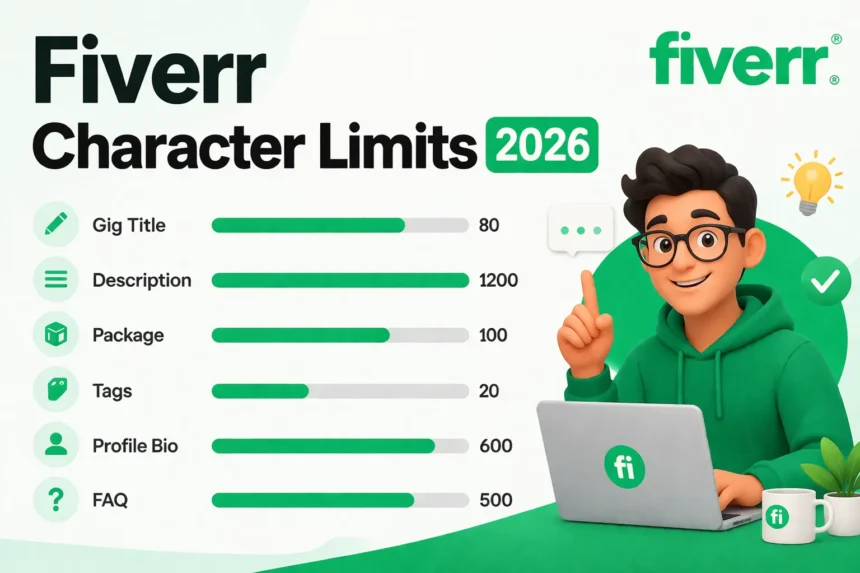
TL;DR: Fiverr has separate character limits for every text field on the platform. Gig titles allow 80 characters but only display 50–59 before cutting off in search. Descriptions go up to 1,200 characters. Package descriptions cap at 100 characters per tier. Each tag allows 20 characters, with 5 tags total. Your profile bio allows 600 characters. Most sellers fill one field and ignore the rest — which means the competition in every other field is almost zero.
Most sellers on Fiverr obsess over their gig description while leaving six other text fields half-empty. The Fiverr character limit for a gig description is 1,200 characters, which most people know. What they don’t know is that their profile bio allows 600 characters, that each package description caps at 100 characters, and that tags have a 20-character limit per phrase. Every unfilled field is a missed signal. This guide covers every Fiverr character limit in 2026, what each field controls, and the exact numbers to target.
All Fiverr Character Limits at a Glance
Before going section by section, here is the complete reference table. Most sellers screenshot this and keep it open while editing their gigs.
| Field | Character Limit | Display Limit | Optimal Target |
|---|---|---|---|
| Gig Title | 80 | 50–59 (cut off after) | 50–59 |
| Gig Description | 1,200 | Full, scrollable | 900–1,100 |
| Package Description (each tier) | 100 | ~80 visible | Use all 100 |
| Search Tags (each tag) | 20 | Full | 2–4 word phrases |
| Profile Bio | 600 | ~300 above fold | 500–580 |
| About Section | ~1,000 | Expandable | 600–900 |
| FAQ Answer (each) | ~500 | Expandable | 200–400 |
| Portfolio Project Description | 120 minimum | Expandable | 200–300 |
This table is the article’s anchor. Each section below breaks down one row in detail.
Allowed Characters, Banned Symbols, and the Formatting Rules Fiverr Doesn’t Document
Character limits are only half the constraint. The other half is which characters actually count, which get silently stripped, and which trigger the dreaded “Title can contain letters and numbers only” error. Most sellers learn these rules by hitting them. Here’s the shortcut.
| Field | What’s accepted | What’s silently stripped | What triggers a rejection |
|---|---|---|---|
| Gig Title | Letters, numbers, spaces, basic punctuation (commas, apostrophes) | Double spaces, leading/trailing spaces | Ampersand (&), slash (/), pipe (|), hashtag (#), @ mentions, emoji, percent (%) |
| Description | Letters, numbers, line breaks, most punctuation, emoji | Markdown formatting, double spaces, HTML tags | Embedded links to off-platform contact methods |
| Tag | Lowercase letters, numbers, spaces, hyphens | Uppercase auto-converts to lowercase | Special characters, emoji, punctuation |
| Profile Bio | Most punctuation, emoji, line breaks | Markdown, HTML | None at character level (contact info triggers separate review) |
| Package Description | Letters, numbers, basic punctuation, emoji | Line breaks (text becomes one line) | Special symbols outside Latin-1 range |
A few things this table doesn’t capture that you’ll only learn by publishing 30+ gigs.
The “I will” prefix is hardcoded and counts toward your 80 characters.
It eats 6 characters before you type a word. Some sellers try “I’ll” or “I will be,” both get auto-corrected back. For non-English account languages, the prefix changes (“Yo voy a” for Spanish, “Eu vou” for Portuguese), and the 80-character total stays the same. Spanish gigs effectively have fewer usable characters than English gigs, a quiet penalty buried in the rules.
Smart quotes and em-dashes from Word or Google Docs break exact-match ranking.
When you paste a description from a document, “curly quotes” (those slanted quotation marks) and en/em dashes get pulled in. They display fine to buyers. But Fiverr’s keyword index treats them as separate tokens, so “client’s content” with a curly apostrophe doesn’t match buyer searches for “client’s content” with a straight one. Always paste through a plain-text editor first.
Emoji count is inconsistent.
Single-codepoint emoji (😀, ❤️) count as 1 character. Compound emoji built from surrogate pairs (👨💻, 🏳️🌈) count as 2 or 4. Putting 3 family-style emojis at the start of your description can silently consume 12 of your 1,200 characters.
Tags auto-lowercase, and hyphens equal spaces.
“SEO Blog Writing” becomes “seo blog writing.” More importantly, “long-form writing” and “long form writing” rank for the exact same buyer searches. Using both is a wasted tag slot.
The practical rule: paste everything through Notepad or TextEdit (plain text mode) before pasting it into Fiverr. You’ll save yourself two rejection cycles and one rankings collapse.
What Is the Fiverr Gig Title Character Limit?
Fiverr allows 80 characters in a gig title. But only 50–59 characters display fully on gig cards in search results before the title gets cut off with an ellipsis.
The mandatory “I will” prefix takes 6 characters. That leaves 44–53 usable characters for the actual service description. On mobile, the cutoff happens even earlier, closer to 45 characters. The practical rule: write for 50 characters first, treat anything beyond that as invisible.
This gap, 80 allowed, 50–59 displayed, is where most sellers go wrong. They write a 75-character title that looks complete in the editor, then wonder why search results show “I will write SEO blog posts for your business and web…” instead of a clean, complete phrase.
Title comparison:
| Version | Character Count | What Displays in Search |
|---|---|---|
| “I will write SEO blog posts for your business and website content” | 67 characters | “I will write SEO blog posts for your busine…” |
| “I will write SEO blog posts for your website” | 47 characters | Full title visible |
The second version ranks for the same keywords and displays cleanly. The first version wastes 20 characters on words buyers never see.
For a deeper look, the full gig title optimization guide includes 40+ ready-to-use title examples across categories, with character counts included.
Mobile vs Desktop Truncation: Why Your Title Is 50 Characters on Paper but 38 on Mobile
The 50–59 character display limit everyone repeats is the desktop number. On mobile, the cutoff is much earlier, and mobile is now the majority of Fiverr buyer traffic.
Here’s what actually displays across the three contexts buyers see your title in.
| Context | Visible characters before cutoff |
|---|---|
| Desktop search results | 50–59 |
| Mobile search results | 38–42 |
| Fiverr’s Choice / promoted cards | 32–36 |
| Category browse page (desktop) | 55–62 |
| Category browse page (mobile) | 40–45 |
The variance comes from two things most sellers never think about.
Font rendering across devices. iOS Safari uses San Francisco. Android Chrome uses Roboto. Both wrap at slightly different character counts even at the same pixel width. Mobile browsers also use slightly different font scaling depending on accessibility settings.
The wide-letter penalty. Letters aren’t equal width. A title full of m, w, and capital letters truncates earlier than one full of i, l, and t. Compare:
- “I will make modern minimalist marketing materials” (50 chars, lots of wide letters): truncates around character 36 on mobile.
- “I will write tight little intro titles fast” (44 chars, mostly narrow letters): fully visible on mobile.
Same character count window. Different visible result. If you’ve ever wondered why two competing gigs at similar lengths get different click-through rates, this is one reason.
The package description has the same problem at a smaller scale. Your 100-character package description shows roughly 55–65 characters on mobile gig cards before the “…more” link. The first 60 characters need to carry the differentiator. Deliverable and word count first, revision count and delivery time after.
Profile bio above-the-fold drops to about 140 characters on mobile. Your article notes the desktop figure is around 300. On a phone, buyers see the first ~140 characters before they have to scroll. The hook lives in the first 140, not the first 300. Reorder accordingly.
The shorter version: write everything to the mobile threshold first, then check it displays cleanly on desktop. Not the other way around.
What Is the Fiverr Gig Description Character Limit?
The Fiverr gig description character limit is 1,200 characters, which is roughly 200–240 words depending on word length.
High-performing gigs in 2026 typically use 900–1,100 characters, not the full 1,200. The reason is simple: the last 100–150 characters often become filler. Buyers scan descriptions in under 30 seconds. Thin padding at the end signals low effort to both the reader and Fiverr’s algorithm.
Three things to know about this field:
Under 800 characters reads as low-effort. Fiverr’s algorithm treats description length as a quality signal. Gigs with short descriptions appear less frequently in search results than gigs with full, keyword-relevant content. A 2024 analysis of Fiverr ranking factors found that description completeness was one of the top signals separating page-one gigs from page-three gigs.
The 1,200-character limit applies only to the description field. FAQ answers, package descriptions, and requirements are separate fields, each with its own limits. Many sellers try to extend their description into other fields, that’s the wrong approach. Each field serves a different purpose.
Target 900–1,100, not the maximum. Writing to the exact limit usually produces padding. The goal is density: every sentence should add a reason for the buyer to click “Order.”
The structure that works: open with the buyer’s problem, describe your solution, list what’s included, state your delivery process, and close with a clear next step. That formula fills 900–1,100 characters naturally.
Fiverr Package Description Character Limit (100 Characters Per Tier)
Each of the three package tiers, Basic, Standard, and Premium, has its own description field. Each allows 100 characters. Most sellers write 15–20 characters here and leave the rest blank.
This is the most ignored field on Fiverr. It’s also one of the easiest to optimize.
100 characters is roughly one clear sentence. That’s enough to tell a buyer exactly what they get in that tier, what’s included, how fast, and how many revisions. Here’s what the gap looks like:
| Tier | Bad Version (18 chars) | Good Version (94 chars) |
|---|---|---|
| Basic | “Basic blog post” | “800-word SEO blog post, 1 keyword, 2 revisions, delivered in 3 business days” |
| Standard | “Standard package” | “1,500-word article, keyword research included, 3 revisions, delivered in 2 days” |
| Premium | “Full package” | “2,500-word pillar post, keyword map, internal linking, 5 revisions, 2-day delivery” |
The good versions are conversion elements. A buyer comparing three sellers on a search results page will read the package description before clicking the gig. Sellers who fill this field give buyers a reason to click. Sellers who leave it blank give buyers nothing.
The significance lies in the comparison logic buyers use. When two gigs have the same price, the one with a specific, detailed package description wins the click almost every time. Understanding how to structure your Fiverr pricing is directly connected to how well you use this field.
How Many Tags Can You Add on Fiverr, and What Is the Character Limit?
Fiverr allows 5 search tags per gig. Each tag has a maximum of 20 characters. All 5 should be used, leaving any tag slot empty is a missed keyword signal.
Tags are not single words. Two-to-four-word phrases perform significantly better than standalone terms. A tag like “SEO blog writing” targets a specific buyer intent. A tag like “writing” is too broad to rank for anything meaningful.
Tag examples by niche:
| Niche | Weak Tags | Strong Tags |
|---|---|---|
| Content writing | writing, blogs, seo | seo blog writing, content writing, blog posts for business |
| Logo design | logo, design, branding | minimalist logo design, brand identity design, logo for startup |
| Video editing | editing, video, youtube | youtube video editing, short form video edit, talking head video |
Tags must align with the keywords in your title and description. Fiverr’s algorithm checks for consistency across fields. A gig titled “I will write SEO blog posts” but tagged with “graphic design” and “video editing” will rank poorly in all three categories because the signals contradict each other.
The rule: use your 5 tags to cover 5 variations of the same service, different phrasings, different buyer intents, all pointing toward the same core offering.
What Is the Fiverr Profile Description Character Limit?
The Fiverr profile bio allows 600 characters. Most sellers use 100–150. That leaves 400+ characters of keyword and trust-building space unused.
600 characters is roughly 90–110 words, one focused paragraph. This is the first thing buyers read when they visit your profile page before clicking any gig. It functions as a pre-qualifier: a buyer who reads your bio and recognizes themselves in the description is more likely to click through to your gig.
Three elements that should appear in a 600-character profile bio:
- Your specialization (who you serve and what you do)
- Your method or tool (what makes your process specific)
- One credibility marker (years of experience, type of clients, measurable results)
Example bio (578 characters):
I help small businesses and e-commerce brands grow organic traffic through SEO-optimized blog content and landing page copy. With 4 years writing for SaaS and retail clients, I specialize in content that ranks on page 1 and converts visitors into customers. My deliverables include keyword research, on-page optimization, and revision rounds until you’re satisfied. If you need content that does more than fill a page, my gigs are a good fit.
This bio uses 578 of 600 characters and covers all three elements. It speaks to a specific buyer, states a specific result, and ends with a soft conversion signal.
The profile bio connects directly to how buyers discover and evaluate sellers. A complete Fiverr profile setup covers every section, including the bio, the about section, and how they interact with gig rankings.
Fiverr About Section and FAQ Character Limits
About section: The About section sits below the bio on your profile page. It allows approximately 600–1,000 characters and expands on click. Most sellers leave it blank. Buyers who read the About section are serious, they’ve already read the bio, scanned a gig, and are still doing research. Filling this section converts that research phase into a purchase decision.
FAQ section: Fiverr allows up to 10 FAQ questions per gig. Each answer allows approximately 500 characters. This field is indexed by Fiverr’s algorithm, it’s a second keyword-rich area beyond the 1,200-character description.
FAQ answers serve two purposes at once. They convert hesitant buyers by addressing objections directly. And they add keyword signals that the algorithm picks up. Most sellers have 0–2 FAQs. Sellers who fill all 10 effectively double the keyword surface area of their gig.
Topics that work well as FAQ answers: delivery time clarification, revision policy, what you need from the buyer, file formats you deliver, and whether you work with beginners. Each of these addresses a real buyer question and can include service-relevant keywords naturally.
It Depends: When Standard Character-Limit Advice Backfires
The reference table at the top of this guide is the starting point. It’s not the whole answer. Optimal numbers shift based on three variables: where you are as a seller, what category you’re in, and what language you sell in.
Here’s how to calibrate.
If you’re a new seller (under 10 reviews)
Standard advice says fill every field to optimal. For new accounts, that backfires. New gigs with maxed-out descriptions and bios sometimes trigger Fiverr’s quality review heuristic, the one that flags overly polished new accounts.
Sit at the low end for the first 30 days:
- Description: 800–900 characters (not 1,100)
- Bio: 380–450 characters (not 580)
- FAQ: 3–4 entries (not 10)
Then expand as your order count crosses 10, 25, and 50. Each milestone is a chance to fill the next layer.
If you run 5+ gigs in adjacent niches
You’re competing with yourself. The algorithm picks one of your gigs per query and surfaces it. If two of your gigs share 70%+ keyword overlap, one suppresses the other.
Force at least 30% unique vocabulary across each gig’s description. Different verbs, different examples, different package descriptions. Same service category, different surface area.
If your category is visual (logo, video, illustration, design)
Buyers in visual categories spend under 8 seconds on the description text before deciding. The gig gallery does the persuasion work.
Optimal description here is 700–850 characters, not 900–1,100. Longer descriptions actually reduce scroll-to-order rate because they push the CTA below the fold on mobile.
If your category is technical or written (translation, legal writing, code review, technical SEO)
Buyers read everything. They’re hiring on the quality of your written word, so your written word matters.
Optimal here is 1,100–1,200. Use the full limit. Detail wins.
If you sell in non-English markets
The 80-character title limit is brutal in German, Russian, Arabic, and Hindi. Average word length in German is roughly 30% longer than English. Russian compounds run even longer.
For non-English gigs:
- Title optimal range shifts to 60–70 characters (not 50–59)
- Description optimal stays roughly the same, but you’ll fit fewer concepts in 1,200 characters
- Tags should use the buyer-search language, not your account language
If 60%+ of your orders come from repeat buyers
Public-facing field optimization matters less. You’re getting most of your work from custom offers, which use a different message field with its own ~2,500-character limit.
The character limits that actually affect your business at this stage are inside the custom offer template and the buyer message system, not the gig listing itself.
The single takeaway: “optimal” is a function of seller stage, category, and language. The reference table at the top of this article gives you the field. This section tells you where to land inside it.
Myth vs Reality: 7 Things Most Fiverr Optimization Guides Get Wrong
Most “Fiverr character limits” articles get written by people who’ve never published a gig. They copy from each other. Half the advice making the rounds is outdated, oversimplified, or just wrong. Here’s what holds up when you actually run gigs.
| Myth | Reality | What to do instead |
|---|---|---|
| Fill every field to the maximum for SEO | The algorithm rewards field completion, not field padding. Maxing out every field with thin content reads as low-quality | Aim for the optimal range, not the ceiling. 900–1,100 chars description, 500–580 bio |
| Tags must exactly match your title keywords | Exact repetition across all 5 tags causes signal deduplication. The algorithm weights one match, not five | 1–2 exact-match tags, 3–4 semantically related variations |
| The 80-character title limit is the only title constraint | There’s an undocumented soft cap around 9–10 words. Titles past it rank worse even when under 80 chars | Aim for 6–8 words. Density beats length |
| Character limits haven’t changed in years | Fiverr quietly adjusted FAQ allowances, package description display behavior, and tag handling at least twice since 2023 | Verify limits directly in the editor before trusting old screenshots |
| Longer descriptions always rank better | Above ~1,050 characters, the marginal ranking benefit reverses for new sellers without order history | Sit at the lower end of the optimal range until you have 10+ completed orders |
| Profile bio length affects gig rankings | The bio affects profile-level signals and buyer trust. It doesn’t directly lift gig search positions | Write the bio for buyer conversion, not gig SEO. They’re separate surfaces |
| The “I will” prefix counts toward your keyword density | Fiverr’s matcher treats “I will” as a stopword in relevance scoring. It still costs 6 characters of your 80-char budget | Treat it as overhead. Your real title budget is 74 characters |
Two of these deserve a closer look.
The myth about description length reversing is the one that costs new sellers the most. New gigs with maxed 1,200-character descriptions and 600-character bios sometimes trip Fiverr’s “spammy new account” heuristic. The algorithm seems to expect new sellers to look new. Filling every field to the maximum on day 1 reads as inauthentic. Sit at the lower end for the first 30 days, then expand as your order history builds.
The exact-match-tags myth is the one I see most in YouTube tutorials. The instinct makes sense: match your tags to your title and Fiverr will know what you’re about. But Fiverr already knows. The tag field is for variations, not repetition. A gig titled “I will write SEO blog posts” with tags “seo blog writing, blog post writing, seo content writing, blog writing service, content writing seo” is competing with itself. The same gig with “seo blog writing, content marketing, long form articles, b2b blog writing, freelance writer” covers five different buyer intents and pulls five different traffic streams.
Why Fiverr Character Limits Matter for SEO
Why Filling Every Field Gives You a Ranking Advantage
Fiverr’s algorithm reads text fields in a priority order: title first, then tags, then description, then profile, then FAQ. Every field left partially filled is a missed keyword signal, and a missed signal means lower visibility in search.
The structure of this advantage is worth understanding clearly. Most sellers fill one field well and treat the others as secondary. This creates a situation where competition in secondary fields is thin. A seller who writes a careful, keyword-relevant FAQ, fills all five tags, and completes their profile bio is competing against very few other sellers for algorithm attention in those areas.
This reflects a broader pattern in Fiverr SEO: the algorithm rewards completeness. Gigs with higher field completion scores appear more often in search results. The character limits define exactly how much space Fiverr has given each seller to communicate relevance. Unused space is a direct ranking disadvantage.
The practical takeaway: treat character limits as a checklist. Before publishing or updating any gig, verify that every field is at or near its optimal target. The table at the top of this guide serves as that checklist. A complete Fiverr SEO approach connects these individual fields into a unified ranking strategy.
The Field Interaction Layer: How Fiverr Cross-References Your 9 Fields (Advanced)
This section is for sellers who already understand the basics. If you’re still working out what to put in your tags, come back to this after you’ve run 3 gigs for 6 months.
The beginner frame treats each field as a standalone keyword bucket. Title here, tags there, description below. Fill each, rank higher.
The algorithm doesn’t work that way. It scores consistency across fields as a separate signal from field-level relevance. This interaction effect is where ranking actually breaks the page-1-to-page-3 barrier.
The 6-touch coherence pattern
Pick one primary keyword phrase, 3 to 4 words long. That phrase should appear:
- In the title (once)
- In at least 2 of your 5 tags (as exact match or close variant)
- 2–4 times in the description (natural placement)
- Once in a package description
- Once in an FAQ answer
- Once in your profile bio (if the keyword fits your overall positioning)
Six touchpoints. One phrase. The algorithm’s consistency check rewards this pattern with higher relevance scoring than any single field could earn on its own.
Coherence above ~70% across these touchpoints boosts ranking. Coherence below ~40% suppresses it even when individual fields are well-written. Gigs that “rank for everything” actually rank for nothing because their signals contradict each other.
Anti-cannibalization across your own gigs
If you run multiple gigs in adjacent niches, the algorithm picks one per query. Never both. You’re competing with yourself.
You can engineer which gig wins. Make one gig’s field overlap with the target query stronger than the others. Strip the secondary gig of that exact phrase and shift it toward a sister keyword.
Example: you have two writing gigs, one for “SEO blog posts” and one for “long-form articles.” If both descriptions mention “SEO blog content,” only one will surface for the “seo blog” search. Decide which, and make the other one say “in-depth articles” instead.
FAQ as the secondary keyword reservoir
FAQ answers are indexed but lower-weighted. This is the right place to put secondary and long-tail variations that would feel forced if jammed into the main description.
Treat each FAQ entry as a mini landing page for one specific buyer query. “How fast can you deliver?” becomes the slot for “rush delivery,” “24-hour turnaround,” “express service.” “What do you need from me?” becomes the slot for “client brief,” “project requirements,” “discovery call.” Each question covers a buyer intent your main description doesn’t have room for.
Sellers with 10 well-targeted FAQs effectively double the keyword surface area of their gig.
The package description / search filter trick
Buyers filter Fiverr search by attributes: fast delivery, unlimited revisions, money-back guarantee. Fiverr surfaces gigs whose package descriptions contain those terms more prominently.
Most sellers set the delivery time and revision count in the package metadata fields and stop there. They never put the words “fast delivery” or “unlimited revisions” in the package description text itself. The metadata gets you into the filter results. The package description text controls your position within them.
Write “24-hour express delivery, unlimited revisions” in the package description, not just “1 day delivery” with the revision slider set to unlimited.
The 30-day decay window
Field changes don’t take effect instantly. Editing a gig triggers a 7-14 day re-evaluation period. Rankings often drop during this window before stabilizing at a new level.
Bulk-editing all 9 fields in one session causes a longer decay than spaced edits over 2-3 weeks. If you’re editing a working gig, change one field per week. If you’re rescuing a stalled gig, change everything at once. The floor isn’t far.
Putting it together
A page-1 gig has 6 fields pointing at the same buyer intent with semantic consistency. The seller’s other gigs point deliberately elsewhere. The FAQ catches the queries the description couldn’t fit.
Character limits define how much space you have. The 6-touch pattern defines what to put in that space across fields working as a system.
That’s the layer most guides never reach.
Wrapping Up
Most sellers treat Fiverr’s character limits as constraints, maximum lengths they try not to exceed. The more accurate frame is that they’re opportunities. Fiverr is telling each seller exactly how much space they have to communicate value to both the algorithm and the buyer. Every character limit represents a field that can rank, convert, or qualify a buyer.
Use the table at the top of this guide as a pre-publish checklist. Before submitting or updating any gig, check each field against its optimal target. Title: 50–59 characters. Description: 900–1,100. Package description: close to 100 per tier. Tags: all 5 filled with 2–4 word phrases. Bio: 500–580. FAQ: at least 5–7 entries.
The sellers who treat every field as a full keyword and conversion opportunity consistently outrank sellers who only optimize the description. The character limits are the same for everyone, what varies is how much of that space each seller actually uses.
Have you checked all eight text fields on your active gigs? Which one did you find most underused?
Frequently Asked Questions
What is the Fiverr gig title character limit in 2026?
Fiverr allows 80 characters in a gig title. However, only 50–59 characters display on gig cards in search results before the title is cut off. The mandatory “I will” prefix uses 6 of those characters, leaving 44–53 characters for the service description. Writing titles longer than 59 characters means the most important words may not display to buyers in search.
How many characters can a Fiverr gig description have?
The Fiverr gig description limit is 1,200 characters, which is approximately 200–240 words. The optimal range for high-performing gigs is 900–1,100 characters. Descriptions under 800 characters appear thin to both buyers and Fiverr’s algorithm. The 1,200-character limit applies to the description field only — FAQ answers, package descriptions, and requirements fields have their own separate limits.
What is the Fiverr profile description character limit?
The Fiverr profile bio allows 600 characters, which is roughly 90–110 words. Most sellers use fewer than 200 characters, leaving significant keyword and trust-building space unused. The profile bio is the first text buyers see when visiting your profile page, before they click any gig. A complete bio should include your specialization, your method or tool, and one credibility marker.
How many tags can you add on Fiverr, and what is the character limit per tag?
Fiverr allows 5 search tags per gig. Each tag has a 20-character maximum. All 5 tags should be used, leaving any tag slot empty removes a keyword signal from the algorithm. Two-to-four-word phrases perform better than single words. Tags should align with the keywords in your title and description to maintain consistency across fields.
What is the Fiverr package description character limit?
Each package tier (Basic, Standard, and Premium) has a separate description field with a 100-character limit. This is one of the most frequently ignored fields on Fiverr. 100 characters is enough for one clear sentence that states the deliverable, revision count, and delivery time. Sellers who fill this field give buyers a concrete reason to choose their tier over a competitor’s during the comparison phase.